Showing posts with label Ham_Radio. Show all posts

Sunday, December 17, 2023

Cebik Pages Update


As noted, things have been tidied and improved, updated to syntax correct HTML with a single CSS file, broken links fixed, some missing content found and added back in. A useful addition is the topics index which makes it easy to find all related pages on a subject, and see them all listed in one place.

I started working on this a few weeks ago when I learned that ON5AU who hosted the only known complete copy had become SK.

After I started looking at the Cebik pages, one thing lead to another, and the end result was significant update which I think was needed considering how useful this is to many.

Happy Holidays!

Tuesday, October 31, 2023

MacLoggerDX Logs Backup Script

MLDX-Backup is a backup script I wrote for MacLoggerDX.
  • It gracefully closes MLDX.
  • Creates tgz archive (gzipped tar file).
  • Excludes .DS_Store, debug files, QSL card images, ADIF conformations log.
  • Keeps the last five backups (removes oldest when new backup is created).

Also includes information on how to manage things with iCloud drive Documents and Desktop syncing if used.

Saturday, September 23, 2023

JS8Call Band Hopping Script

Recently someone asked on the JS8Call group about band hopping or cycling through several bands on a 10 minute cycle.

Jordan the author of JS8Call suggested using the API to do this.

I decided to see what was around and found this well documented js8net API library, with that I was able to interact with the API from the command line, and could read and set the frequency.

Python is not something I'm familiar with, so I used ChatGPT to help me write a python script that would cycle through a list of frequencies changing to the next one every few minutes.

The result was JS8BandHop, a fairly simple Python script.

Friday, June 2, 2023

How to build WSJT-X from source on macOS

WSJT-X
Compile WSJT-X on Mac.

Works on my spare Late 2014 5K iMac running Big Sur 11.7.10 with Xcode 13.2.1.

Information was passed onto me from AA5SH - Notes on Building WSJT-X on my Mac. The main difference is this guide uses current stable release of Hamlib (4.5.5) from their Github repo.

The steps create a directory called /Users/<username>/wsjtx-build, with a sub-directory each for Hamlib and WSJT-X source code and building.

A detailed guide of how I have my rig control, logging, and digi mode apps configured is at:
https://lonneys-notebook.blogspot.com/2023/06/macloggerdx-flrig-with-wsjt-x-fldigi.html


Xcode


Xcode can be downloaded from the App Store, for older versions of macOS it can be downloaded from https://developer.apple.com/xcode/resources/ > Additional downloads > Search for the version number.

Supported version of Xcode for a given version of macOS see https://en.wikipedia.org/wiki/Xcode.

There are two parts to install Xcode one is just to install from the App Store or download from the Apple developer site, and then also from the command line run the following command:

xcode-select --install

Agree to the Xcode license agreement:

sudo xcodebuild -license


CMake


Download the latest CMake universal from http://www.cmake.org/download/

Open the DMG then drag and drop the application bundle onto the supplied /Applications link.

To complete the install process run:

sudo "/Applications/CMake.app/Contents/MacOS/cmake" --install


Homebrew


Install Homebrew from https://brew.sh/ 

Run the two commands shown at competition to add it to the path.

Install gcc@9:

brew install gcc@9


Mac Ports


Install Mac Ports from https://www.macports.org/

Quit and re-open terminal after installing. 

Install the required ports, answer yes to dependancies or use port -N (non interactive):

sudo port install autoconf
sudo port install automake
sudo port install libtool
sudo port install pkgconfig
sudo port install texinfo
sudo port install fftw-3-single +gcc9
sudo port install asciidoc
sudo port install asciidoctor
sudo port install libusb-devel
sudo port install boost
sudo port install qt5
sudo port install qt5-qtmultimedia
sudo port install qt5-qtwebsockets


Build Hamlib


This only needs to be done once.

Using the current stable release, 4.5.5 at this time.

mkdir -p ~/wsjtx-build/hamlib-prefix/build
cd ~/wsjtx-build/hamlib-prefix
git clone --depth 1 --branch 4.5.5 https://github.com/Hamlib/Hamlib.git src
cd src
./bootstrap
cd ../build

../src/configure \
   --enable-static \
   --disable-shared \
   --disable-winradio \
   --prefix=$HOME/wsjtx-build/hamlib-prefix \
   CFLAGS="-g -O2 -mmacosx-version-min=10.7 -I/opt/local/include" \
   LIBUSB_LIBS="-L/opt/local/lib -lusb-1.0"

make
make install-strip

If make install-strip fails, run make install


Build WSJT-X


Download source code tarball (.tgz) from:


Note: WSJT-X Improved includes additional features (some later make it into regular WSJT-X), and alternate layouts.

Extract the tarball file, you should see a folder named wsjtx-<version number>.

Open the src folder with-in this and extract wsjtx.tgz, this is the source code.

mkdir -p ~/wsjtx-build/wsjtx-prefix/src
mkdir -p ~/wsjtx-build/wsjtx-prefix/build

Copy the source code with in the expanded wsjtx folder into ~/wsjtx-build/wsjtx-prefix/src

cd ~/wsjtx-build/wsjtx-prefix/build

FC=/usr/local/Cellar/gcc@9/9.5.0/bin/gfortran-9 \
   cmake \
   -D CMAKE_PREFIX_PATH="/opt/local/libexec/qt5;~/wsjtx-build/hamlib-prefix;/opt/local" \
   -D CMAKE_INSTALL_PREFIX=~/wsjtx-build/wsjtx-prefix \
   -D CMAKE_OSX_SYSROOT=/Applications/Xcode.app/Contents/Developer/Platforms/MacOSX.platform/Developer/SDKs/MacOSX12.1.sdk/ \
   ~/wsjtx-build/wsjtx-prefix/src

Substitute the Mac OS X SDK version you have installed in the above command if you have a different version.

cmake --build .
cmake --build . --target install # Builds wsjt-x application bundle 
cmake --build . --target package # Builds .dmg file in build directory


Other Info


Misc Notes


Find QT version (installed via Mac Ports): /opt/local/libexec/qt5/bin/qmake -v


Build JS8Call on macOS


Not tried it my self yet.

Thursday, June 1, 2023

MacLoggerDX + Flrig with WSJT-X, Fldigi, JS8Call

How to configure MacLoggerDX and Flrig, with WSJT-X, Fldigi, JS8Call for rig control and one click log uploading to LoTW, QRZ, and Club Log.

Jump to:


Summary

My shack PC is an iMac 5K 27" (Late 2015), the rig is an Icom IC-7300. This is how I have it setup in the event anyone else finds it useful! This is a living post that I occasionally update.

MacLoggerDX is a well designed full featured logging application, it expects to own the rig CAT control with features that make use of rig control, and can share control with other applications via built-in DXLab TCP server.

Flrig is a nice rig control program providing control and feedback of most features. This is very useful when remoting into the shack mac, or directly. Flrig must own the CAT control and shares rig control with other applications via a TCP port (XMLRPC).

Fldigi is a well featured digital modes application, and supports many keyboard to keyboard modes such as DominoEX, Feld Hell, MFSK, Olivia, PSK31, RTTY, Thor, and more.

WSJT-X / WSJT-X Improved well known for FT8/FT4, I also use it for WSPR on HF, MSK144 and Q65-30A on 6m.

JS8Call / JS8 is a keyboard to keyboard chat mode which uses the FT8 protocol (with its error correcting/decoder tech) as the transport. JS8Call also supports mailbox, relays, position reports and email/sms via APRS (one way).

Problem:

  • MacLoggerDX does not support connecting to Flrig, nor can the serial port be shared.
  • Fldigi does not support MacLoggerDX's DXLab TCP server as a rig control option.
    • There is a work around for PTT control via included Apple script, and options that allow Fldigi to learn the rig frequency/mode via broadcasts from MacLoggerDX.
    • The included Apple script for logging from Fldigi to MacLoggerDX didn't work properly for me at least - not sure why.

Solution:

  • Flrig owns the CAT control.
  • Hamlib rigctld supports connecting to Flrig's xmlrpc server.
  • MacLoggerDX supports connecting to Hamlib NET rigctl.
  • Fldigi gains full function control via Flrig.
  • An alternate Fldigi to MacLoggerDX logging script written in Python.
  • The other digi mode apps support Flrig.
  • Any that don't support Flrig likely support Hamlib NET rigctl or the DXLab TCP server built into MacLoggerDX.

Hardware / Software versions as of 22-Sept-2025:

  • Icom IC-7300 firmware 1.4.
  • iMac 5K 27" (Late 2015), macOS 12.7.6 (Monterey).
  • MacLoggerDX 6.57.
  • WSJT-X 2.8.0 Improved (has some features I like).
    • Version 3 is garbage, becomes unresponsive and crashes after a few minutes.
  • JS8Call 2.3.1.
  • Fldigi 4.2.08.
  • Flrig 2.0.08.
  • Hamlib 4.5.5.

macOS desktop showing MacLoggerDX connected to Flrig, WSJT-X and Fldigi decoding
Flrig with MLDX connected, WSJT-X on 17m FT8, and Fldigi decoding end of ARRL digital broadcast on PSK31
(click for larger image - sorry the retina display makes for a large image)


Icom IC-7300 Setup

macOS contains the Silicon Labs drivers for Icom rigs, plug in the USB cable and it works.

Menu > Set > Connectors:

  • ACC/USB Output Select: AF.
  • ACC/USB AF Output Level: 25%.
  • ACC/USB AF SQL: OFF (Open).
  • ACC/USB AF Beep/Speech Output: OFF.
  • USB MOD Level: 50%.
  • DATA OFF MOD: MIC,ACC.
  • DATA MOD: USB.
  • CI-V:
    • CI-V Address: 94h.
    • CI-V Transceive: OFF.
    • CI-V USB Port: Unlink from [REMOTE].
    • CI-V USB Baud Rate: 115200.
    • CI-V USB Echo Back: ON (this should match the echo setting in Flrig).
  • USB Serial Function: CI-V.
  • USB SEND/Keying:
    • USB SEND: OFF.


Network Security!

MacLoggerDX's DXLab TCP server, Flrig's xmlrpc server, and rigctld's TCP server when started bind to and listen on all network interfaces.

Since for simplicity they offer no authentication or encryption system, anything else that can reach the machine over the network can interact with and issue commands to these rig control applications.

Unless you highly trust your local network (anyone and anything else connected to it), and these applications are all on the same machine, it would be recommended to turn on the macOS firewall under System Preferences > Security and Privacy > Firewall and only allow incoming connections specifically as needed. Once turned on a prompt about allowing incoming connections to these applications will be shown, clicking Deny will still allow local machine access via the loopback address (127.0.0.1).

Note: MacLoggerDX is a signed application, the macOS firewall will silently add an exception for it. If the DXLabs TCP server is enabled it will be reachable from the network unless it's set to deny under macOS firewall settings which would limit it to local machine access only.

One way to authenticate and secure the communication for these applications between different machines over untrusted networks would be to tunnel the ports over SSH.

Testing connectivity to TCP ports using netcat (nc) e.g:

nc -zv 192.168.1.100 12345


Flrig Setup

http://www.w1hkj.com

http://www.w1hkj.com/flrig-help - Users Manual

https://groups.io/g/linuxham - Email list/forum

Flrig offers control of various radio functions and displays feedback.

With Flrig and my IC-7300 this lets me control most of the useful front panel controls - volume, NB/NR, ATT, Pre amps, Tuner on/off, output power, and more. Also displays useful information including signal level, Po, SWR, ALC, voltage etc. 

The ALC reading is especially useful with digi mode apps to make sure audio drive levels are correct, e.g. no ALC action. SWR is also perhaps equally useful to know that things are working as expected - ALC action can also indicate high a SWR condition as well.

Very useful if you remote control the station, even if it's from another room in the house which I sometimes do.

Configure:

  • Xcvr:
    • Rig: IC-7300.
    • /dev/cu.usbserial-xxxxx.
    • Baud: 115200 (matches setting in radio)
    • 1 (one stop bit): checked.
    • Echo: checked (this setting should match the Echo setting in the rig).
    • Rest unchecked.
    • Poll intvl: 200 (ms/milliseconds, lower increases Flrig CPU use).
    • USB audio: checked.
  • Server:
    • Xmlrpc port: 12345 (can be anything, I use the default).
  • Poll:
    • All options checked except the two disable options.
  •  Restore:
    • Unchecked everything except Use xcvr data.

After configuring, close and re-open Flrig for the xmlrpc port change to take effect.


Hamlib NET rigctl Setup

Needed for MacLoggerDX rig control via Flrig

https://hamlib.github.io

https://hamlib.sourceforge.net/html/rigctld.1.html

Note: MacLoggerDX can be left disconnected to simply catch the logs which contain all the required info from digi mode apps. When on voice modes (SSB/AM/FM) digi mode apps and Flrig can be closed, rig control given to MacLoggerDX (check box top left on main screen) allowing it can capture and log mode/frequency automatically when manually logging a QSO. If that is sufficient then the rigctld setup is not needed. However MacLoggerDX has features that make use of rig control, and I like to minimize the number of steps/settings etc to do or change when changing modes..

How it works:

  • Flrig owns the CAT control.
  • Hamlib rigctld supports connecting to Flrig's xmlrpc server.
  • MacLoggerDX supports connecting to Hamlib NET rigctl.

Setup:

  • Install homebrew - https://brew.sh
  • Install hamlib - https://formulae.brew.sh/formula/hamlib - brew install hamlib.
  • Run from Terminal: /usr/local/bin/rigctld -m 4 -r 127.0.0.1:12345
    • "-m 4" is the rig type (flrig), "-r 127.0.0.1:12345" is flrig's xmlrpc IP:port.
  • Configure MacLoggerDX to use Hamlib NET rigctl on port 4532: Port type: Hamlib NET Rigctl, port 127.0.0.1:4532, radio Hamlib NET rigctl.

Here is a script to start Flrig and rigctld, then close rigctld when Flrig is no longer running:

#!/bin/bash
# Launch Flrig
open -a /Applications/flrig-2.0.02.app
# Wait for 2 seconds
sleep 2
# Launch rigctld
/usr/local/bin/rigctld -m 4 -r 127.0.0.1:12345 &
# Monitor Flrig and terminate rigctld when closed
while pgrep flrig > /dev/null; do sleep 2; done
killall rigctld 

Save as Flrig-Rigctld.sh, from Terminal run "chmod +x Flrig-Rigctld.sh" to make it executable, and "./Flrig-Rigctld.sh &" to run it in the background (&), allows you to keep using that terminal session.

When I figure out a nicer way, I'll update this. I had tried to wrap the script in an macOS application bundle, but the while loop causes the icon to bounce in the dock forever.

What would be nice is if Flrig supported running shell commands on startup and exit.


MacLoggerDX Setup

https://dogparksoftware.com/MacLoggerDX.html

https://dogparksoftware.com/MacLoggerDX Help/MacLoggerDX Help.html - Online Manual

https://groups.google.com/g/macloggerdx - Email list/forum

Preferences > Station:

  • WSJT-X checked.

Preferences > Radio:

  • Port Type: Hamlib NET rigctl.
  • Port 127.0.0.1:4532.
  • Radio: Hamlib Net rigctl.

First time MacLoggerDX errored, closed and reopened then it worked.

Preferences > Log > Use mode groups (uncheck - allows filtering by sub/digi modes in main log window)


Lookup and Logging Services

Preferences > Lookup > QRZ XML:

QRZ Logbook Upload API Key - QRZ forums.

The QRZ logbook can sync with LoTW to pull in confirmations.

https://logbook.qrz.com


Preferences > Look Up > Club Log:

Club Log among other things is good for tracking your progress, and requesting QSL cards if the op enables OQRS etc. Setup is simple, input your username and password, uncheck Show in comments (unless you want the date/time of the Club Log upload to be added to the comments).

Club Log can sync with LoTW to pull in confirmations.

https://clublog.org


Preferences > Look Up > LoTW:

Location name same as setup in TQSL.

Note: The location is useful for example if operating portable to activate a grid on 6m, setup the location in TQSL. Locations button under the Station tab can be used to manage different locations, or manually update grid on the Station tab, and the location name under Lookup > LoTW. Stations Prefs in the MacLoggerDX manual covers this.

Password is not needed unless one was set for the location in TQSL.

https://lotw.arrl.org

https://www.arrl.org/tqsl-download


It can take up-to a few minutes before the log entries appear in your QRZ logbook and LoTW.


One Click Log Uploads

For these Look Up and logging services, you can also enable the option to upload in real time for each or some. This removes of burden of constantly having to select and upload new log entries. If unsure about a log entry, uncheck Upload QSOs in Real Time (the main option above the different lookup tabs switches it on/off for all), log it, then decide what to do.

In WSJT-X, JTDX under Preferences > Reporting > Prompt me to log QSO, when checked a prompt to log the QSO will appear when RR73/73 are sent/received as the QSO is completed. If real time log uploads are enabled in MacLoggerDX, one click and the QSO is logged and uploaded to the configured services.


Switch from UDP unicast to multicast

When more than one application will be consuming UDP packets, e.g. when WSJT-X and JT-Bridge are running together, switch from using a UDP unicast address (127.0.0.1) to a multicast address (224.0.0.1), open Terminal and run:

defaults write com.dogparksoftware.MacLoggerDX wsjtx_multicast_group "224.0.0.1"

For more info see
https://dogparksoftware.com/MacLoggerDX Help/mldxfc_wsjtx.html search the page for "multicast".

In WSJT-X, JS8Call, and JTDX > Reporting tab > UDP server, change 127.0.0.1 to 224.0.0.1


Band Plans

One annoyance I found with MacLoggerDX are its band plans (Preferences > Band Plan), if you go "out of band" to a "non-standard" FT8 frequency for example, then touch anything in MacLoggerDX it'll change modes on you to RTTY or CW - pretty annoying!

Fix is to edit/remove the CW and RTTY sub-bands, and add sub bands for USB-D mode to cover where you're likely to use digi modes.


iCloud Drive

The MacLoggerDX manual FAQ section recommends disabling iCloud Drive Documents and Desktop syncing.

I make use of iCloud Drive for my Documents, disabling it is not an option. I found that MLDX might be placing locks on some of the files it uses in the Documents/MLDX_Logs folder, this would cause syncing problems with iCloud Drive Documents where it would not always upload/download reliably and keep everything the same across multiple machines.

The work around I found was to rename MLDX_Logs to MLDX_Logs.nosync then create a symbolic link to it with the original folder name.

With MLDX closed, open terminal and run:

cd ~/Documents
mv MLDX_Logs MLDX_Logs.nosync
ln -s MLDX_Logs.nosync MLDX_Logs

iCloud Drive will ignore any file or folder names ending in .nosync, while it will sync the symbolic link, it doesn't do anything with files/folders the link points to.

To make a backup copy of the MLDX_Logs and store them in iCloud Drive, create a new folder in Documents called MLDX_Backup, close MLDX and periodically copy the contents of MLDX_Logs over to it, or rely on Time Machine backups, or both.

MLDX Backup is a script I wrote and use to create backups into a backup folder under Documents which iCloud Drive syncs.

I still find on occasion the iCloud Drive syncing gets out of step the service can be restarted by running: killall bird

The process will then automatically restart, and everything gets caught up.


Update Internet Files

When MLDX is left running, overnight it should perform an Update Internet Files. For me this doesn't appear to work.

Once a week or so I run it manually from the File menu.


WSJT-X Setup

https://wsjt.sourceforge.io/wsjtx.html

https://wsjt-x-improved.sourceforge.io - WSJT-X Improved

Preferences > General:

  • Decoded Text Font: Andale Mono 14 (nice easy font to read).

Preferences > Radio:

  • Rig: Flrig.
  • Network Server: 127.0.0.1:12345.
  • PTT Method: CAT.
  • Mode: Data/pkt (sets rig to USB-D and wide filter - should be 3000 Hz).
  • Split Operation: Fake it (WSJT-X will move the TX freq of rig so the audio is not passing near the filter edges).

Preferences > Audio:

  • Input: USB Audio Codec, Mono.
  • Output: USB Audo Codec, Mono.
  • Remember settings by band: Both unchecked.

Preferences > Reporting:

  • Enable UDP requests, UDP Server 224.0.0.1 port 2237.
  • Checking Prompt to log QSO will auto prompt to log it when WSJT-X sees/sends RR73 or 73. If MacLoggerDX is configured to auto upload, then QSOs are uploaded in real time as they are completed.


WSJT-X Audio Levels

Receive: On quiet band with no signals (e.g. 10m or 6m tuned away to a quiet spot), adjust AF output in rig and/or macOS sound device sliders (if supported) to show 30 dB. This is what the WSJT-X user guide suggests under section 5 Transceiver Setup > Receiver Noise Level.

When I've seen weak signal ops (160m and below, 6m and above) discussing receive levels, For FT8/FT4 they recommend setting the level to show 60 to 80 dB, and AGC set to fast for best performance. With the FT modes and ~60 dB, the quick and short reason is weaker signals will be with-in the dynamic range of the A/D converter, at 30 dB they wont be.

For MSK144 and Q65 I've seen 30 dB and AGC off recommended.

The setting to adjust in the IC-7300 is ACC/USB AF Output Level.

Clipping and over driving in the receive audio chain can also occur, be aware of that.. I had a local telling me on 6m FT8 I had harmonics all over the band with a screen shot to prove it (it looked awful), after some tests with another local said it was clean, if the issue was my transmit levels then everyone should see the problem.

What do I use? Currently 60 dB and AGC fast (0.1s) is the default I leave things set to, adjusting them for MSK144 and Q65 as needed (memory permitting). 

Transmit: Detailed document FT8 - Avoiding Harmonics and Audio Settings by W9MDB. Recommend reading and working through the document as it goes into good detail, including understanding ALC behavior which varies with different radios. This post by Bill G4WJS (SK) also talks about ALC.

Basic steps for reference:

  1. Rig RF Power set to 100% or max it is capable of for the duty cycle.
  2. WSJT-X Pwr slider set to 100% or 0 dB.
  3. WSJT-X Audio Settings > Mono.
  4. Applications > Utilities > Audio MIDI Setup > check/set rig audio (e.g. USB CODEC) format is 1 ch 16-bit integer 48.0 kHz for both mic/speaker (in/out).
  5. Operating System sound level slider for the rig's audio interface set to 0% - System Prefs > Sound > Output > select rig's audio device > adjust Output volume slider minimum.
  6. Click Tune in WSJT-X.
  7. Raise the OS sound level slider until ALC action occurs then back it off until zero ALC action, this should also be full RF output or very close.
  8. Re-select the speakers in System Prefs > Sound which sets the default output device for other apps and system sounds.
  9. RF output is now fully controlled via the slider in WSJT-X.
  10. Dropping Pwr slider in WSJT-X to -3 dB should half the RF output, -6 dB should be about 25%. I found this varies between bands with my IC-7300.
Note: The FT8 audio guide suggests using left channel for both speaker/mic, and 2 ch 16-bit integer 48.0 kHz (with out explaining why), I found when set to 2 ch, the configure speakers button is clickable - I wonder if this is applying audio processing? When set to 1 ch the button is greyed out. I also got no TX audio when set to left in WSJT-X, the tool tip in WSJT-X suggests using mono with a single radio.

Same process for other digi mode apps, but once it is set for one, the only adjustment needed should be the slider or level in the app it self.

After getting audio configured following these steps it "feels" like I get more successful QSO completions on FT8 or less that don't complete but don't have any actual data to prove this.


WSJT-X Frequency Calibration, and Waterfall Flattening

Optional, but nice to do.

https://lonneys-notebook.blogspot.com/2022/06/wsjt-x-freqcal-waterfall-flattening.html

CTY.DAT

WSJT-X includes cty.dat (Country data), this helps map callsigns to their actual locations/entity.

WSJT-X Improved 2.7.x (rc) has an option to download cty.dat in Preferences > Colors tab.

Otherwise updated cty.dat files can be placed in the log directory:

https://www.country-files.com/contest/wsjt-x

Big CTY: https://www.country-files.com/category/big-cty

The Big CTY file will also work, tested this with a KL7 station located in Oregon. They were calling CQ with CN84 grid, WSJT-X showed their entity as Alaska, checking QRZ showed they were located in Oregon/CN84. After dropping in the big cty.dat file into the log directory and restarting WSJT-X their entity was correctly shown as USA.


Q65 on 6m

Some notes on configuring and using Q65 on 6m for EME, terrestrial, and auroral scatter. 

https://lonneys-notebook.blogspot.com/2022/04/try-out-6m-q65-eme-or-terrestrial.html


Build WSJT-X from source

WSJT-X can also be built from source on macOS.

https://lonneys-notebook.blogspot.com/2023/06/how-to-build-wsjt-x-from-source-on-macos.html


JTDX Setup

https://sourceforge.net/projects/jtdx/files

https://jtdx.freeforums.net (Support forum)


JTDX is an alternative to WSJT-X for some modes. Basic configuration is essentially the same as WSJT-X in JTDX v2.2.159.

I like consistency..

I was able to make the color coding match by having both WSJT-X and JTDX pref windows open, and use the eye-dropper tool to match the colors.

JTDX uses the same two log file names wsjtx.log and wsjtx_log.adi, one of the things these are used for is color coding what entities/stations/bands you've worked or not.

If like me you want to have the luxury of being-able to switch between these two apps have it all match up and be the same, this can be done by creating two symlinks:

  1. From JTDX, File > Open Log Directory, quit JTDX.
  2. Delete/move/rename wsjtx.log and wsjtx_log.adi
    1. These files can also be merged into the ones used by WSJT-X by removing duplicates and combining them if you want to get it all into one place.
  3. Open Terminal, change to the JTDX log directory, and create the symlinks:
    1. cd ~/Library/Application\ Support/JTDX
    2. ln -s ../WSJT-X/wsjtx.log wsjtx.log
    3. ln -s ../WSJT-X/wsjtx_log.adi wsjtx_log.adi
  4. ls -l will show where the symlinks point:
wsjtx.log -> ../WSJT-X/wsjtx.log
wsjtx_log.adi -> ../WSJT-X/wsjtx_log.adi

JTDX's S meter and Output power options (enable on the Radio settings tab) also work (displayed top right corner) when using Flrig for CAT control.


JT-Bridge Setup

https://jt-bridge.eller.nu

JT-Bridge is the Mac equivalent of JT-Alert. This tool becomes increasingly useful as you need to start looking for countries, states, or grid squares that are hard to get or have not yet been logged and confirmed, this helps filter all band activity down to what you're looking for or need by syncing with the MacLoggerDX log. As QSOs show confirmed in MacLoggerDX by running Log > LoTW Confirmations, JT-Bridge is kept in sync by running File > Sync with Logger.

Preferences > Network:

  • Multicast Group: 224.0.0.1.
  • Port: 2237.
  • Listen on port (leave empty).

There is also GridTracker, but I have not gotten into using it yet.


Stress Test FT8

https://jp1lrt.asablo.jp/blog/2021/06/25/9391328

With WSJT-X v2.5.4 I get 58 decodes, with JTDX defaults 62, and after tweaking the settings 68. My Late 2015 iMac has a 4 GHz Quad Core i7-6700K CPU - this was the highest CPU option available in these at the time!

On busy bands CPU performance makes a big difference. Further discussions I've seen also indicate more memory helps. If we want the bleeding edge of performance out of the FT modes then max the CPU and memory options, close all unnecessary applications etc. 

Since WSJT-X v2.6.0-rc became available for testing, it's very close to JTDX defaults with the number of stations decoded each cycle, sometimes a few more, a few less, but always fairly close from what I've seen.

With the sample file and WSJT-X 2.6.1 I get 67 decodes, but I've seen as many as 103 on a busy 10m band  (many JAs calling a V26 station) - that above file may not be the ideal test of the decoder performance? Perhaps what we need are set of test files better suited to use as benchmarks for WSJT-X.

Maybe we can squeeze a little more decoder success by renicing WSJT-X or JTDX to give it a higher priority?

I have used htop (brew install htop) to renice the WSJT-X jt9 process to -20 (maximum, yes less is more) - jt9 process appears to be doing the decoding as it spikes in CPU use during the decodes at the end of each FT8 sequence, wsjt-x process is the rest of the application from what I can tell, its CPU use increases when menus and options are clicked/changed etc


FT8 Operating Guide

https://www.g4ifb.com/FT8_Hinson_tips_for_HF_DXers.pdf - highly recommended reading!


JS8Call Setup

http://files.js8call.com/latest.html (2.2.0)

https://github.com/js8call/js8call/releases (2.3.0 and later)

https://groups.io/g/js8call - Email list/forum

Basically the same as WSJT-X, except the radio tab has two sub tabs - CAT Control and Rig Options. TCP server and port address is set under CAT Control but confusingly appears as a greyed out unchangeable option under Rig Options!

Preferences > Radio:

  • Rig: Flrig.
  • CAT Control tab > Network Server: 127.0.0.1:12345.
  • Rig Options tab:
    • PTT Method: CAT.
    • Mode Data/Pkt.
    • Split Operation: Fake it.
    • TX delay 0.2 s.
    • Hold PTT between frames (checked).

Preferences > Audio:

  • Input: USB Audio Codec.
  • Output: USB Audo Codec.
  • Remember settings by band: Both unchecked.

Prior to MLDX v6.46, in JS8Call if the UDP port was changed to 2237 under the Reporting tab, logging a QSO in JS8Call would also send the log to MLDX the same with WSJT-X, but WSJT-X changed the API and MLDX was updated to suit, which broke this functionality with JS8Call.

Since this change, log a QSO as per normal in JS8Call, then open the logs directory Log > Open Log Directory, right/control click the js8call.adi file > Open With > MacLogger DX to import any new QSOs from the ADI file.

I got into JS8Call a while back because I was interested in APRS over HF. I also enjoy the keyboard chat modes too.


Fldigi Setup

https://wikipedia.org/wiki/Fldigi

http://www.w1hkj.com - Downloads

http://www.w1hkj.com/FldigiHelp - Users Manual

http://www.w1hkj.com/beginners.html - Beginners guide to Fldigi

http://www.w1hkj.com/modes - Sights and sounds of digi modes

https://sourceforge.net/p/fldigi/wiki/osx_howto/ - How to compile Fldigi on macOS

https://groups.io/g/linuxham - Email list/forum


Configure:

  • Operator-Station:
    • Fill in as required.
    • Station Locator: <input 6 character grid>
  • Call > Lookup:
    • Database lookup: QRZ.com, enter QRZ user/pass.
  • Misc > PSK Reporter (check):
    • Automatically spot callsigns in decoded text.
    • Send reception report when logging a QSO.
    • Report rig frequency.
    • Logon to pskrep when starting Fldigi.
    • Note: 6 character grid is required under Configure > Operator-Station > Station Locator
    • Click Initialize.
  • Soundcard > Devices:
    • PortAudio: Checked.
    • Capture: USB Audio Codec.
    • Playback: USB Audio Codec.
    • Device support full duplex: Checked.
  • Rig Control > Flrig:
    • Enable flrig xcvr control with fldigi as client.
    • Poll Interval (msec): 200.
    • Flrig xmlrpc server: 127.0.0.1:12345.

TX Audio (adjust for zero ALC) and WF levels, bottom of Fldigi main window:

  • WF Uppser Signal Level (dB): -40 (0 if level set for 60 dB in WSJT-X).
  • WF Signal Range (dB): 60.
  • TX Level Attenuator (dB):  -8.


Logging

The _Log2MLDX.scpt included with the MacLoggerDX disk image didn't work properly for me.

Logging on MacLoggerDX with Fldigi is a Python script I found searching the MacLoggerDX Google group, it works perfectly.

The Nov 27, 2022 version uses an ADIF import, after clicking the macro button in Fldigi, MacLoggerDX will prompt to import the file and add it to the log, however MLDX will not auto upload imported logs (if this is enabled/used).

After an email with Fred it sounds like a future update may include UDP as an option again to eliminate the import prompt from MacLoggerDX.


Previous Setup?

If Fldigi was previously setup to work with MacLoggerDX using the work arounds, these can be undone:

  • PTT script can be removed from being auto started when Fldigi starts.
  • In MacLoggerDX > Prefs > Station, UDP Broadcast can be unchecked.
  • In Fldigi > Config > Logging > MacLogger, Connect to MacLogger can be unchecked.


More Info

Signal Identification Wiki.

QSO Today with Dave W1HKJ (author of Fldigi, Flrig, and more).

70 Years of Amateur Digital Modes - pretty interesting ! 

DominoEX and DominoEX FAQ.

Data & Text mode Digital Radio Communication - VU2NSB.

Feld Hell Club - Info about the mode, frequencies, and nets.

FSQ (Fast Simple QSO) - Info about the mode and frequencies.

Monday, February 6, 2023

40m 1/3 Wave Elevated Vertical 50 Ohm

40m elevated vertical (1/3 wave) using 40ft / 12m Spiderbeam pole, 3 x 16ft / 4.9m radials, 50 ohm feed.

EZNEC 40m 1/3 wave vertical antenna view


We can feed a vertical off-set by extending the vertical element and shortening the radials to raise the feed-point impedance while maintaining resonance.

The radials must be electrically isolated from a metallic mast (if used), and a high quality 1:1 current balun to isolate the coax shield from the antenna system, I'm using a Balun Designs 1115t.

Elevation Plot:

EZNEC elevation plot


SWR Plot:

EZNEC SWR plot


In this case making use of a 40 ft / 12 meter Spiderbeam pole mounted 10 ft / 3 m above ground on the 2nd level deck at the back of the house.

Modeling this using bare 12 AWG wire, the radial length to achieve resonance was 23 ft / 7 m. At least part of the reason my radials ended up shorter will be because I used plastic coated wire, and the vertical wire is attached to a fiberglass pole, but there may be something else having an effect..

However after trimming the radials for resonance the analyzer showed a perfect match:

RigExport analyzer showing complex impedance


The analyzer hung off the balun with a 6" jumper, since the SWR didn't change after connecting the feed-line is an indication the balun is doing its job.

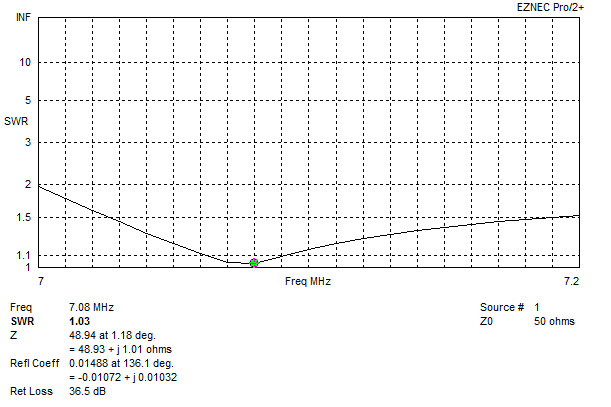
The SWR response turned out to be more broad-banded than predicted according to the IC-7300, it covers the whole 40m band only rising to 1.5:1 at 7.3 MHz (feed with 70 ft of LMR-400):

IC-7300 SWR plot


Photo of the antenna:

Picture of 40m 1/3 wave vertical


The longer radiator moves the current maximum slightly higher above surrounding clutter.

One radial runs out near the end corner of the house, one out to a tree in the back yard, and one along the under side of the deck, this also allowed mounting the balun out of the weather. With the shorter radials I was easily able to maintain ideal symmetry.

Compared to a 1/4 wave ground plane model same height above average around with four radials, the 1/3 wave vertical peak gain is 0.2 dB less but one degree lower at 22 degrees.

Some or more of that 0.2 dB might be gained back with the higher current maximum in the real world environment with ground clutter, and broader 1:1 SWR vs 1.3:1 or higher with a ~36 ohm 1/4 wave. Either way a negligible trade off (if any) for a much more convenient radial configuration and 50 ohm feed. Field strength readings would be the next step.

Noise floor is not too bad at S4 to S5, compared to S3 to S4 on my 130 ft doublet at 55 ft height.

We'll see how it works out :-)

Model file: GP-40m-40ft.

Sunday, January 22, 2023

40m 2 Element Delta Loop

Parasitic (driver + reflector), reversible, direct 50 ohm feed, equal length 75 ohm sections for matching and the open stub long enough to reach a common switching point.

Recently during the middle of the day I noticed a local station here on the US west coast spotting EU stations on 40m FT8 via psk reporter. This is fairly unusual due to day time D layer absorption, but not impossible. I emailed asking for more info about the antenna they were using, they replied saying they had built a two element delta loop array based on 40 Meter Parasitic Delta Loop Array by W8WWV.

Trying to model this by hand in EZNEC the results were not great, especially trying to get a 50 ohm match. Since there are interactions with element spacing, resonance, etc - change one thing it throws off several others.

Decided to give this problem to the optimizer in AutoEZ. Optimizing for gain and direct 50 ohm feed, I let the optimizer adjust the length of the bottom wire, the height of both loops, and the feed positions symmetrically, and vary two equal lengths of 75 ohm coax for the open stub and matching section to keep it simple.

I was pleasantly surprised when AutoEZ found a perfect solution using two equal length sections of 75 ohm coax that will easily reach a common point, and provide a direct 50 ohm feed!

Searching around for information on designs using switched open stubs, there are a few which use 3/8 Î» open stub for the reflector.

Interesting to note, the starting model I had used equilateral triangles (what I happened to have), the optimizer settled on right angle triangles (very close at 89 degrees). Agrees with accepted wisdom for vertically polarized deltas, see SCV Polarized Wire Antennas: The Delta Branch - L.B. Cebik.

On to the details..


EZNEC antenna view

Item

Measurement

Horizontal wire height above ground

3 m / 9.8 ft

Horizontal wire length

18.28 m / 60 ft

Height to apex above ground

12.31 m / 40.3 ft

Side wire length

13.04 m / 42.78 ft

Element spacing

7 m / 23 ft

Feed position up side

16.3% or 2 m / 6.5 ft

75 Ω coax length from each element

13.74 m / 45 ft (VF=1)


Each 75 ohm line meets at a common point:

  • 75 ohm line connected to the driver matches the system to 50 ohms.
  • 75 ohm line to the other element is left open circuit resonating it as a reflector.
  • Direction reversed by swapping which is open and which is connected to the driven element.

With the 75 ohm lines being equal lengths and one is open circuit, the switching network/relay wiring is kept simple.

Current chokes at each loop feed-point: With the VF of the coax used measured and taken into account, there should be enough excess length to use for a current choke (winding it around ferrite) at each loop feed-point (the choke must preserve the line impedance and electrical length), and to reach a common point for switching.

The model uses bare 12 AWG copper wire, and VF of 1 for the 75 ohm coax. The model would need to be updated if using insulated wire and re-optimized, the VF of the coax being used would need to be measured with an analyzer and length multiplied by that number (e.g. 0.8 or what ever it is) to get the electrical length.

As a test when I updated the model using RG-11 factoring in VF and loss figures, there is a small 0.3 dB or so drop in gain, this will be partly from the SWR on the matching section and the effect of the open stub causing small losses.


EZNEC elevation plot
Elevation Plot


EZNEC azimuth plot
Azimuth Plot


EZNEC SWR plot
SWR Plot
Coax losses would smooth this out more


Now if only I had the room to build it :-)

EZNEC and AutoEZ model files: 40m 2 Element Delta Loop.


Dec 2024, I ran across The Parasitical Right-Angle Delta towards the bottom of https://antenna2.github.io/cebik/content/wire/hsyg.html, simpler system using shorted stubs with 75 ohm coax, and 50 ohm feed.


Saturday, October 29, 2022

PSK31 Fldigi Macros for Field Day

PSK31 with waterfall

These are the PSK31 Fldigi macros I setup for Winter Field Day last year.

I came across a lot of PSK31 activity by chance (7.070, 14.070), but it took a while to figure out how to take part..

Frustratingly the information needed to simply get setup and get going is not found in one place. I like to give points to field day/contest stations but not seriously compete. Are they trying to get more people into contesting by keeping it mysterious?

Info collected from:


I set these up on an empty macro row in Fldigi:

ANS CQ (Answer CQ):

<TX>
<CALL> <CALL> de <MYCALL> <MYCALL> k
<RX>


W/FD Exch (Send exchange for your station, e.g. 1H is single home op, WWA is western WA):

<TX>
<CALL> 1H WWA 1H WWA de <MYCALL>
<RX>


73 (Send when your exchange was copied):

<TX>
73 de <MYCALL>
<RX>


QSO @>> (Start free text message):

<TX>
<CALL> de <MYCALL> <MYCALL>


RX (Go back to receive):

de <MYCALL> k
<RX>


Thursday, June 23, 2022

HamAlert Automate Telnet Login

HamAlert is a useful tool to receive alerts for when a desired station appears.

I use this with the Club Log band slots integration to alert for new countries on bands I don't yet have confirmed.

With the Telnet option I keep a window open where the alerts scroll by quietly and I can glance at to see if there is anything new.

Typing in usernames and passwords is a chore, here is a shell script that'll auto login (replace username and password stars as required):

#!/usr/bin/expect
set timeout 30
spawn telnet hamalert.org 7300
expect "login: "
send "K1LH\r"
expect "password: "
send "*****\r"
interact

Here it is in action:

HamAlert telnet session


Friday, June 17, 2022

WSJT-X FreqCal & Waterfall Flattening

Simple method using WSJT-X to do frequency calibration of an Icom IC-7300 (or any rig with a reference adjustment), and waterfall flattening.

Frequency Calibration

I got the idea from this post https://groups.io/g/icom705/message/532

Let the radio warm up for a couple hours or so in a room at average operating temperature. Mine is on 24/7 since I leave it running overnight on 160m FT8, or 6m MSK144 to spot meteor scatter stations, so there is no warming up and cooling down :-)

WSJT-X has a FreqCal mode - the manual covers how run a calibration cycle which will work with any radio by configuring WSJT-X to do an internal adjustment compensating for the radio, or it can also be used to align the radio it self - easy if it offers a reference adjustment via a menu option.

If in range of WWV or WWVH, or another (highly) accurate time standard broadcast, edit the FreqCal frequencies (Settings > Frequencies) to use only those you can receive.

Switch to FreqCal (Mode menu) and select one of the time standard frequencies from the frequency/band drop down.

WSJT-X sets the radio to USB mode and 1500 Hz below the carrier frequency, it then measures tone or heterodyne and displays the frequency.

If your radio has a frequency reference adjustment such an the Icom IC-7300 (Menu > Set > Function > REF Adjust) adjust it until you are close as possible to 1500 Hz in fMeas column or 0.0 in DF column.

WSJT-X FreqCal

Here I was able to get very close using WWV on 10 MHz, I see about the same DF on WWV at at 5 and 15 MHz. It will drift slightly with changes in room temp which you can see by repeating the measurement.

If the radio doesn't have a user setting for frequency reference, execute a WSJT-X frequency calibration cycle per the manual with the Measure box checked (this writes the fmt.all file in logs directory). I found I had to let it run for at least two or three cycles. Edit fmt.all and remove any lines with a * at the end, then run solve for calibration.

The latter may be more accurate, WSJT-X will apply the offset needed internally, but I didn't like it showing this offset subtracted/added to the WSJT-X frequency display (blame OCD) and it only applies to WSJT-X when it is running.

More words about FreqCal by AG6EE at WSJT-X Calibration.

Waterfall Flattening

A good guide by KA1GT - https://bobatkins.com/radio/wsjtx_wide_graph.html - while orientated for EME use the steps can be followed to optimize your waterfall.

After running through all that this is what my waterfall looks like

WSJT-X waterfall Ref Spec

The one signal at 1090 Hz is -17 dB on a quiet 6m band.

Wednesday, May 11, 2022

2m 5/8 over 1/4 wave vertical ground plane

Hustler CG-144 is one example of this type of antenna, I also had one of these from a different mfgr as my first 2m base station antenna, which worked ok.

Searching for information or a description of how this antenna works, how to build one, or a model turned up nothing. The only real unknown is the phasing coil, after sleuthing around the internet for a bit I found this phasing coil from Improving the Super-J. This appears to be fairly close to the CG-144 measurements, and does the trick. There is nearly 180 degrees of phase shift from one end to the other, and with a 1/4 wave element under it, and 5/8 above it close to 50 ohm match.

EZNEC model - 2m-58ovr14-wave-GP.

Issues: Bandwidth is narrow in the model (~2 MHz < 1.5:1), maybe because of 12 AWG wire to keep it simple.


EZNEC antenna view
Antenna view

EZNEC elevation plot
Elevation plot 2 meters height above average ground

EZNEC create helix
How to create the coil with EZNEC Create Helix function


Sunday, April 10, 2022

Try Out 6m Q65-A EME or Terrestrial

With a 6m Yagi and weak signal digital mode Q65-A it's possible to receive EME (Earth Moon Earth) signals during moonrise or moonset.

Q65 can also be used for terrestrial contacts where other weak signal modes such as FT8 may not succeed.

It's also possible to do "QRP EME" on 2m and 70cm, see QRP EME - An incomplete Guide (KG5CCI).

Note: Unlike on FT8, WSJT-X wont make use of Split fake it/rig to keep the TX audio in the middle of the filters, if you get too far away from 1500 Hz power output will start to drop off.

More info


Configuring WSJT-X for Q65 and 6m terrestrial

Mode > Q65

6m > 50.275 MHz

File > Settings > Enable VHF and sub-mode features (not sure that is required)

File > Settings > Decode after EME delay - only used for EME, leave unchecked for terrestrial - though I’ve had this checked and its worked ok.

Decode > Fast for terrestrial (remember to set this back to normal or deep for FT8 and other modes). Enable averaging, and Auto clear AVG after decode on.

Terrestrial: On the main WSJT-X screen set the offset to 1500 Hz, F Tol to 100 or 200, Submode A, T/R 15 or 30 - these last two settings indicate the mode, e.g. Q65-15A, Q65-30A.

Once a QSO starts change F Tol to 100, 50, or 20.

WSJT-X Wide Graph has a Q65_Sync setting.

https://wsjtx.groups.io/g/main/topic/83263895 that post has a lot of info about terrestrial Q65. Suggests that using 15s T/R for Q65-15A is very close in performance to 30A, and twice as fast. Also covers other sub-mode combinations and QRP use.

In practice 30-A on 6m seems to be the most commonly used Q65 submode.


Here is a more recent QSO on 6m Q65-30A with W7OUU who is 500 mi / 800 km south east of me in Idaho, the band was otherwise closed with no FT8 activity.

They were running 1.1 kW with 7 elements, I was running 85 watts with 3 elements. This QSO took around 45 minutes to complete, and 15 minutes before I got the first decode (Q65 averaging at work):

WSJT-X Q65-30A QSO

I was able to reliably decode them on nearly every cycle after the first decode, with my much lower power output and lower gain antenna it took some time for them to decode my messages, but we got there in the end, and DN22 is a new grid on 6m for me too!

I've since worked W7OUU again, and WB7UNU in Spokane 200 miles east for another new grid with the band was otherwise closed.

Final thought: Since Q65 uses averaging to build confidence in subsequent decodes, and can take advantage of any propagation mode (tropo, aircraft scatter, meteor scatter, etc), this QSO may have used a combination of these to complete with enough "fragments" eventually making it though for a successful decode.


Auroral Propagation

With a recent Auroral opening (23-Mar-2023) on 6m was the first time I'd experienced this. On SSB and CW the signals were quite distorted which is normal, but they are readable.

It was then suggested to try Q65-30C or Q65-15B (same tone spacing, half the time). Listening to the tones with the volume up they sounded distorted, and yet it worked reliably. I was able to complete a couple of QSOs quite easily with good decodes on each sequence, and one on SSB:

Auroral 6m QSOs

This was quite a nice surprise, as the distorted FT8 signals I heard did not decode. Q65 certainly seems to be the magic mode for the magic band!


Earth Moon Earth

My interest in EME starts in the mid 90s when I was a freshly minted new ham, friend and I got invited (likely we invited our selves) to see Paul ZL1PE's 2m EME setup. Back then it was CW only (no digital modes existed then for EME, or much else).

Paul had built an H stack of four long boom 2m Yagi's with elevation and azimuth rotator, home brewed an amplifier using something along the lines of a 3CX1000 (I forget exactly), high gain masthead pre-amp and high powered coaxial relays, the feedline was hardline. Amazing stuff to see, and a lot of effort for a propagation mode where you could only use CW when the moon was up.

With the advent of digital modes and home computers faster than we could imagine 30 years ago and now take for granted, the barrier to entry for EME is much much lower.


Much thanks to Bob ZL1RS for most of the EME information.


Where is the moon?

Find when and where the moon is with something like https://www.timeanddate.com/moon/


Antennas, ground gain

With a Yagi pointed at the horizon (a regular horizontal Yagi installation) the added advantage of ground gain can be made use of during moonrise and moonset.

Antenna height, higher not always better! Consider these two 4NEC2 plots of 7 element Yagis at different heights, one at 7 meters / 23 feet vs 18 meters / 60 feet:

4NEC2 Yagi elevation plots
Plot by Bob ZL1RS


Red is the Yagi at 7 meters, it has one broad lobe that will cover between the horizon and about 15 to 20 degrees elevation. The same antenna at 18 meters, has 3 lobes, the moon will pass through each of those much quicker and be "lost" in the nulls.


Assessing the local noise floor for EME

Test 1 - Disconnect the antenna and with WSJT-X note the noise floor with the dB meter bottom left. If there is a difference of more than 10 dB when connected, the local noise floor might be too high.

Test 2 - Preamps - With antenna aimed at moonrise/set direction, turn preamp(s) on and AGC to fastest setting. If any signal level is registered on the S meter (indicating AGC action in the receiver) the local noise floor might be too high.

For me living in city my local noise floor is too high based on the second test as I get AGC action in the receiver. I'd need use to higher gain Yagi(s) with elevation rotators to get away from the noise sources when the moon is (much) higher in the sky.


Configuring WSJT-X for Q65 and 6m EME

Mode > Q65

File > Settings > Enable VHF and sub-mode features (not sure that is required)

File > Settings > Decode after EME delay (that one is important)

Decode > Deep (some say fast is more sensitive). Enable averaging, and Auto clear AVG after decode on

On the main WSJT-X screen set the offset to 1500 Hz, F Tol to 100 or 200, Submode A, T/R 60 (these last two settings indicate the mode, e.g. Q65-60A).

WSJT-X Wide Graph has a Q65_Sync setting.


Frequencies, where to find others on EME

Most EME activity is in the 50.180 to 50.210 area with 50.188 to 50.208 being most popular for sked arrangements. You wont find it tuning around.

A DT of 2.5 seconds indicates EME, DT of 0.0 or 0.1 indicates terrestrial propagation modes.

ON4KST runs an online chat service (runs in browser), goto http://www.on4kst.info/chat/start.php and choose EME all bands/mode, this is where coordination between stations happens.

HB9Q EME Logger is another.


Transmitter Power with EME

Receiving Q65 via EME is the first step, transmitting typically power levels around 1 kW are used.